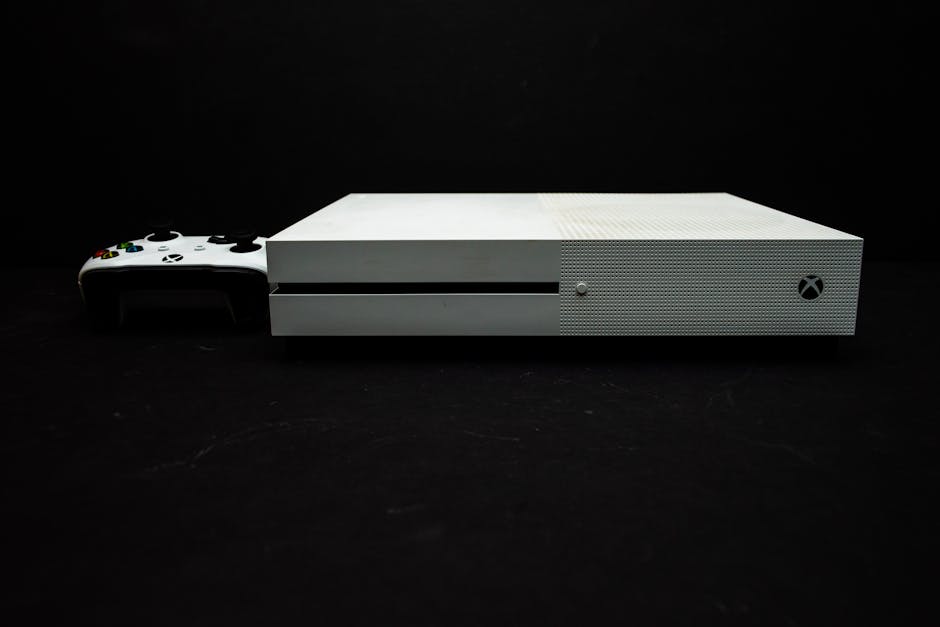
Overview of Xbox Series X|S Consoles
The Xbox Series X and Series S represent Microsoft’s latest generation of gaming consoles, delivering significant improvements over their predecessors. Both consoles feature custom AMD processors with RDNA 2 architecture, ultra-fast SSD storage that dramatically reduces load times, and support for ray tracing technology that brings realistic lighting and reflections to compatible games. The Xbox Series X is the flagship model, offering true 4K gaming at up to 120 frames per second, 1TB of storage, and a disc drive for physical media. Meanwhile, the Xbox Series S provides a more affordable entry point with digital-only gaming, 512GB of storage, and performance targeting 1440p resolution.
One of the most compelling features of both consoles is their extensive backward compatibility. Players can enjoy thousands of titles from the original Xbox, Xbox 360, and Xbox One libraries, with many games receiving automatic enhancements like improved frame rates, faster loading, and higher resolutions. This means your existing game collection remains valuable and playable on the new hardware, making the transition to next-generation gaming seamless and cost-effective.
The choice between Series X and Series S depends on your gaming priorities and budget. If you want the absolute best performance, have a 4K television, and prefer physical game discs, the Series X is the clear choice. However, if you’re comfortable with digital downloads, game primarily at 1080p or 1440p, and want to save money, the Series S delivers exc nt value while still providing access to the same game library and next-generation features.
Xbox Game Pass Ultimate: Best Value for Money
Xbox Game Pass Ultimate stands as one of the best deals in gaming, combining Xbox Game Pass for console and PC, Xbox Live Gold for online multiplayer, and EA Play membership into a single subscription. For one monthly fee, subscribers gain access to hundreds of high-quality games spanning multiple genres, including day-one releases of all Microsoft first-party titles like Halo, Forza, and Starfield. The service also includes cloud gaming capabilities, allowing you to stream games directly to compatible devices without downloading them first.
The Game Pass library constantly rotates with new additions and occasional removals, but consistently maintains a strong selection of AAA titles, indie gems, and classic games. Recent highlights have included major releases like Starfield, Forza Motorsport, and Hi-Fi Rush available on launch day at no additional cost. Third-party publishers regularly add their games to the service as well, with titles from Bethesda, Activision Blizzard, and numerous independent studios enriching the catalog. The EA Play integration adds another layer of value with access to popular franchises like FIFA, Madden, Battlefield, and Mass Effect.
To maximize your Game Pass Ultimate subscription, take advantage of the cloud gaming feature to try games before downloading them, use the Xbox app on PC to access the PC Game Pass library, and keep an eye on the “Leaving Soon” section to prioritize games that will be removed from the service. Many subscribers also use the Microsoft Rewards program to earn points through searches and activities that can be redeemed for Game Pass subscription time, effectively reducing or eliminating the monthly cost.
Accessories for Xbox Series X|S Consoles
Enhancing your Xbox gaming experience often starts with the right accessories. The official Xbox Wireless Controller remains the standard option, featuring improved ergonomics, a dedicated share button, and textured grips compared to Xbox One controllers. For extended gaming sessions, the Xbox Rechargeable Battery Pack eliminates the need for disposable batteries and provides up to 30 hours of gameplay per charge. Alternatively, third-party options like PowerA Enhanced controllers offer additional programmable buttons and customization at lower price points, though they typically use wired connections or require separate batteries.
Storage expansion is another critical consideration, especially for Series S owners with limited internal space. The official Seagate Storage Expansion Card provides seamless plug-and-play storage that matches the console’s internal SSD performance, allowing you to run Series X|S optimized games directly from the expansion. While more expensive than standard external drives, this performance parity is essential for next-generation titles. For backward compatible Xbox One, Xbox 360, and original Xbox games, any USB 3.0 external hard drive works perfectly and costs significantly less, making it an economical option for expanding your library of older titles.
Audio accessories can dramatically improve immersion and competitive performance. The Xbox Wireless Headset offers exc nt sound quality, simultaneous Bluetooth and Xbox wireless connectivity, and intuitive on-ear controls at a reasonable price. For premium audio, third-party options from SteelSeries, Astro, and Turtle Beach provide advanced features like customizable EQ settings, superior microphone quality, and enhanced spatial audio. When shopping for accessories, watch for seasonal sales events like Black Friday, Prime Day, and Microsoft Store promotions that frequently offer 20-40% discounts on official Xbox hardware.
Setting Up Your Xbox Series X|S Console
Setting up your new Xbox console begins with connecting the power cable and HDMI cable to your television or monitor. Power on the console using the Xbox button on the front panel, and the setup wizard will guide you through language selection, network connection, and system updates. For the best experience, connect your console to your router via Ethernet cable for faster downloads and more stable online gaming, though Wi-Fi connectivity works well for most users. The initial system update may take 15-30 minutes depending on your internet speed, so patience during this first boot is important.
Once the system update completes, you’ll sign in with your Microsoft account or create a new one. This account serves as your Xbox identity, storing your gamertag, achievements, game saves, and subscription information. If you’re upgrading from an Xbox One, your existing account transfers seamlessly with all your digital purchases, game progress, and friends list intact. The console will then prompt you to configure display and audio settings, where you can enable features like 4K resolution, HDR, and 120Hz output if your display supports them. The console automatically detects your TV’s capabilities and recommends optimal settings.
Setting up parental controls and family settings is straightforward through the Xbox Family Settings app or directly on the console. Parents can create child accounts with customized restrictions on screen time, content ratings, online communication, and spending limits. The system allows you to set different rules for each family member and receive activity reports showing what games were played and for how long. These controls work across Xbox consoles, Windows PCs, and mobile devices, providing consistent protection regardless of where your children play.
Tips for New Xbox Series X|S Owners
The Xbox Series X|S user interface builds upon the Xbox One dashboard with improved speed and organization. The home screen features a customizable layout where you can pin your favorite games and apps for quick access. The new Quick Resume feature is particularly impressive, allowing you to suspend multiple games simultaneously and return to exactly where you left off within seconds, even after powering down the console completely. This works across several titles at once, making it easy to switch between different games without losing progress or waiting through loading screens.
Customizing your console settings enhances both performance and convenience. Navigate to Settings > General > TV & Display Options to configure resolution, refresh rate, and HDR settings specific to your display. Enable Auto HDR in the system settings to add high dynamic range lighting to backward compatible games that didn’t originally support it. In the Accessibility settings, you’ll find options like button remapping, text-to-speech, and colorblind modes that make gaming more inclusive. The console also supports variable refresh rate (VRR) and auto low latency mode (ALLM) on compatible displays, reducing input lag and screen tearing for smoother gameplay.
Managing storage effectively prevents frustration as your game library grows. The console’s storage management interface shows exactly how much space each game occupies and allows you to move games between internal and external storage. Series X|S optimized games must run from the internal SSD or official expansion card, but you can store them on external drives and transfer them back when needed, which is faster than redownloading. Enable automatic updates in the system settings so your games and console firmware stay current even when the console is in standby mode, ensuring you’re always ready to play without waiting for patches.
Troubleshooting Common Issues on Xbox Series X|S Consoles
Game download and update problems are among the most common issues Xbox owners encounter. If downloads are stuck or progressing slowly, first check your network connection speed and ensure no other devices are consuming bandwidth. Try pausing and resuming the download, or cancel it completely and restart from the queue. Sometimes clearing the console’s alternate MAC address (Settings > General > Network Settings > Advanced Settings > Alternate MAC Address > Clear) and restarting can resolve persistent download issues. If specific games won’t update, uninstalling and reinstalling them often fixes corrupted files, though this requires redownloading the entire game.
Connectivity and online multiplayer issues typically stem from NAT type restrictions or network configuration problems. Check your NAT type in Settings > General > Network Settings; an “Open” NAT provides the best experience, while “Moderate” or “Strict” NAT types can cause matchmaking difficulties and party chat problems. If you have a strict NAT, you may need to configure port forwarding on your router or enable UPnP (Universal Plug and Play). Restarting your router and console together often resolves temporary connection drops. For persistent Xbox Live service issues, check the Xbox Status page online to see if there are known outages affecting your region.
Hardware and software glitches occasionally occur but are usually fixable without professional service. If your console won’t turn on, try a different power outlet and ensure the power brick (Series S) or cable (Series X) is firmly connected. For frozen screens or unresponsive behavior, hold the Xbox button on the console for 10 seconds to force a shutdown, wait 30 seconds, then power back on. If games crash frequently or display graphical artifacts, ensure your console has adequate ventilation and isn’t overheating. Performing a soft reset (holding power button) or clearing the cache often resolves software-related glitches. For serious issues, the console includes a factory reset option that preserves your games and apps while refreshing system files.
Xbox Series X|S: Performance and Graphics Optimization
Optimizing your console’s performance settings ensures you get the best possible gaming experience. Many Series X|S enhanced games offer performance modes that prioritize frame rate over resolution, typically targeting 60fps or 120fps at lower resolutions, and quality modes that maximize visual fidelity at 30fps or 60fps. The right choice depends on your preferences and display capabilities. Competitive multiplayer games benefit significantly from higher frame rates, while cinematic single-player experiences often look stunning in quality mode. Some games like Forza Horizon 5 and Halo Infinite include multiple preset options, allowing you to experiment and find your ideal balance.
Display settings play a crucial role in visual quality. Enable 4K resolution in your console settings if you have a compatible television, and turn on HDR for supported games to experience enhanced contrast and color depth. For displays that support 120Hz refresh rates, enable this option in Settings > General > TV & Display Options > Video Modes to unlock high frame rate gaming in compatible titles. The console’s calibration tools help you adjust brightness, contrast, and color settings to match your specific display, ensuring accurate image reproduction. Variable refresh rate (VRR) support eliminates screen tearing and stuttering when enabled on compatible displays.
Energy efficiency settings allow you to balance performance with power consumption. The console offers two power modes: Instant-On, which keeps the console in a low-power state for quick startup and background downloads, and Energy Saver, which fully powers down the console to minimize electricity usage. Instant-On is convenient but consumes more power over time, while Energy Saver reduces your environmental impact and electricity costs with only slightly longer startup times. You can also configure the console to automatically shut down after periods of inactivity, preventing unnecessary power consumption when you forget to turn it off manually.
Exploring Xbox Series X|S Exclusive Games and Features
The Xbox Series X|S library continues expanding with exclusive titles that showcase the hardware’s capabilities. Upcoming releases include highly anticipated games like Fable, Perfect Dark, and Avowed, all developed by Microsoft’s first-party studios. These exclusives launch day one on Xbox Game Pass, providing immediate access to subscribers without additional purchase. Current standout exclusives include Forza Motorsport with its photorealistic graphics and advanced physics simulation, Starfield offering vast space exploration, and Hi-Fi Rush delivering stylish rhythm-based action. These games demonstrate the console’s power through features like ray-traced reflections, instant loading, and smooth 60fps or 120fps performance.
Beyond exclusive titles, the Series X|S consoles offer unique features that enhance all gaming experiences. The Quick Resume functionality mentioned earlier works across multiple games simultaneously, a feature unmatched by competing platforms. The console’s velocity architecture combines custom SSD technology with dedicated decompression hardware, enabling loading times measured in seconds rather than minutes. Smart Delivery ensures you always play the best version of cross-generation games, automatically downloading Series X|S optimized versions when available without requiring separate purchases or manual selection.
Many existing games receive free Series X|S enhancements that dramatically improve their performance and visuals. Titles like Cyberpunk 2077, The Witcher 3, and Red Dead Redemption 2 have been updated with higher resolutions, improved frame rates, and enhanced graphical effects specifically for the new consoles. These enhancements often include ray tracing, faster loading, and higher quality textures that weren’t possible on previous hardware. The FPS Boost feature automatically increases frame rates in select backward compatible games, sometimes doubling or quadrupling the original performance without requiring developer updates. This commitment to improving both new and existing games ensures your library continues to look and play better over time.
Frequently Asked Questions (FAQ)
Can I play Xbox One and Xbox 360 games on my Xbox Series X|S console?
Yes, both Xbox Series X and Series S support extensive backward compatibility with thousands of games from Xbox One, Xbox 360, and original Xbox libraries. Most Xbox One games work without any issues, and many receive automatic enhancements like faster loading times, improved frame rates, and higher resolutions on the new hardware. Xbox 360 and original Xbox games that were previously made backward compatible on Xbox One also work on Series X|S consoles. Your digital game purchases and physical discs (Series X only, as Series S is digital-only) transfer seamlessly, and cloud saves ensure your progress carries over. Some games even benefit from FPS Boost technology that increases frame rates beyond their original performance.
How do I manage and share my Xbox Game Pass Ultimate subscription with family members?
Xbox Game Pass Ultimate can be shared with family members through the Home Xbox feature. Set your console as your Home Xbox in Settings > General > Personalization > My Home Xbox, and anyone who uses that console can access your Game Pass library and play your games, even when you’re signed in on a different console. This effectively allows two consoles to use one subscription simultaneously—your Home Xbox where family members play, and whichever console you’re currently signed into. However, only one console can be designated as your Home Xbox at a time, and you can only change this setting a limited number of times per year. For more comprehensive family sharing, Microsoft also offers Xbox Family Settings that let you manage multiple accounts with parental controls and shared payment methods.
What accessories are compatible with Xbox Series X|S consoles?
Xbox Series X|S consoles are compatible with most Xbox One accessories, including controllers, headsets, racing wheels, and fight sticks. All Xbox One wireless controllers work with the new consoles, though they lack the improved features of the Series X|S controller like the share button and enhanced ergonomics. Official Xbox accessories like the Elite Wireless Controller Series 2, Xbox Wireless Headset, and various licensed third-party peripherals function perfectly on the new hardware. For storage expansion, any USB 3.0 external hard drive works for storing and playing backward compatible games, but only the official Seagate Storage Expansion Card can run Series X|S optimized games at full performance. Kinect sensors are not supported on Series X|S consoles, as Microsoft has discontinued that technology. When purchasing new accessories, look for “Xbox Series X|S compatible” labeling to ensure full functionality with the latest features.
Explore more xbox guides on our site.
Top Product Recommendations
| Product Name | Rating | Key Feature | Est. Price | Action |
|---|---|---|---|---|
| Best Xbox Pick | ★★★★★ | Top-rated overall | $25–$45 | Check Lowest Price on Amazon |
| Budget Xbox Option | ★★★★☆ | Great for beginners | $12–$28 | Check Lowest Price on Amazon |
| Premium Xbox Choice | ★★★★☆ | Pro-level results | $50–$90 | Check Lowest Price on Amazon |
Affiliate Disclosure: This post contains affiliate links. We may earn a commission if you buy through our links, at no extra cost to you.
Leave a Reply