Overview
Building a budget gaming PC in 2026 doesn’t mean sacrificing performance for affordability. With the right component selection, you can assemble a capable rig that handles 1080p gaming smoothly without breaking the bank. The key is understanding which parts deliver the best value and where you can save without compromising your gaming experience.
Balancing performance and cost requires careful research and smart shopping. Modern budget components have come a long way, offering features that were once reserved for high-end builds. By focusing on 1080p gaming specifically, you can allocate your budget more efficiently since you won’t need the most powerful hardware designed for 4K resolution.
Key considerations include component compatibility, future upgrade paths, and thermal management. A well-planned budget build should last several years with minor upgrades, making it a smart investment for gamers who want quality without premium pricing.
Quick pick: Compare top-rated Pc options.
CPU and Cooler
The processor forms the foundation of your gaming PC, and 2026 offers exc nt budget options. **AMD’s Ryzen 5 7600** and **Intel’s Core i5-13400F** both deliver solid gaming performance at reasonable prices. These CPUs handle modern games efficiently while leaving room in your budget for a capable graphics card.
When choosing a CPU cooler, stock coolers included with many processors work adequately for budget builds. However, investing $25-40 in an aftermarket tower cooler like the **Thermalright Assassin X 120** or **ID-COOLING SE-224-XT** provides better temperatures and quieter operation. These coolers are compatible with both AMD and Intel platforms.
Proper cooling extends component lifespan and maintains consistent performance. Budget coolers with four heat pipes and aluminum fins strike the right balance between cost and cooling capacity. Ensure your chosen cooler fits your case dimensions before purchasing.
Motherboard and RAM
Your motherboard selection depends on your chosen CPU platform. For AMD Ryzen builds, **B650 motherboards** offer exc nt value with PCIe 4.0 support and upgrade potential. Intel builders should look at **B760 chipset boards** that provide similar features without premium pricing. Brands like ASRock, MSI, and Gigabyte offer reliable budget options.
**16GB of DDR5 RAM** (2x8GB) running at 5600MHz or 6000MHz represents the sweet spot for budget gaming in 2026. Dual-channel configuration significantly improves performance over single modules. Look for kits from Corsair Vengeance, G.Skill Flare, or TeamGroup for reliability.
RAM timing and stability matter more than chasing the highest speeds. XMP/EXPO profiles make configuration simple, automatically applying tested settings. Stick with reputable manufacturers to avoid compatibility issues and ensure your system runs stable under gaming loads.
GPU and Storage
The graphics card receives the largest portion of a gaming PC budget, and rightfully so. For 1080p gaming in 2026, the **AMD Radeon RX 7600** or **NVIDIA GeForce RTX 4060** deliver exc nt performance in modern titles. These GPUs handle high settings comfortably while staying within budget constraints. Expect 60+ fps in demanding games and over 100 fps in competitive titles.
Storage selection impacts both budget and user experience. A **500GB NVMe SSD** serves as your primary drive for the operating system and frequently played games. Models with PCIe 3.0 or 4.0 interfaces from Western Digital, Crucial, or Samsung provide fast load times. Add a 1TB or 2TB HDD later if you need additional storage capacity.
Balancing storage capacity and performance means prioritizing speed where it matters most. Your operating system and favorite games benefit tremendously from SSD speeds, while less-played titles and media files can reside on cheaper mechanical storage added later as budget allows.
Case and Power Supply
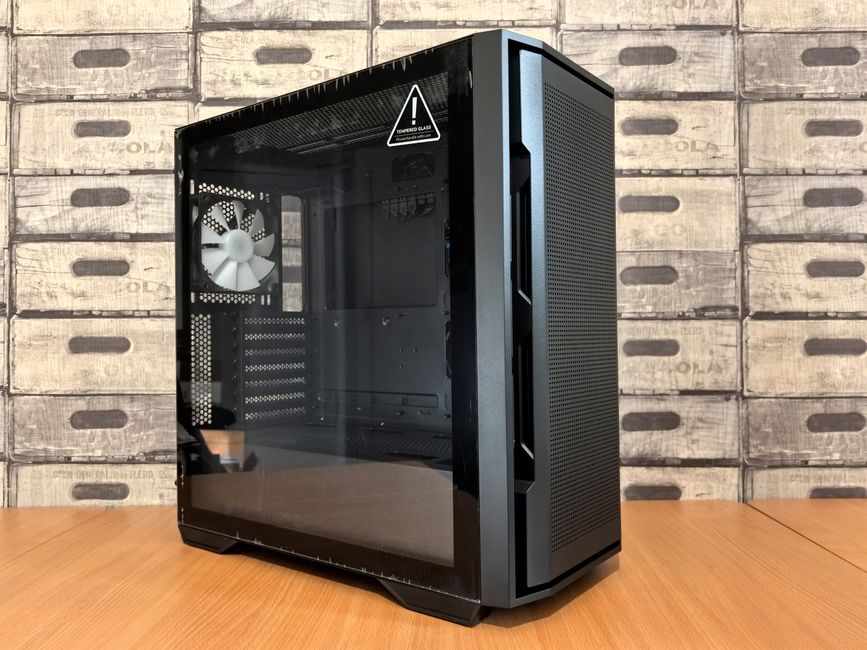
A quality PC case doesn’t require premium pricing. Look for options like the **Montech AIR 100** or **Deepcool CC560** that offer good airflow, cable management options, and tempered glass panels. Mesh front panels improve cooling performance significantly compared to solid fronts. Ensure your case fits your motherboard form factor and GPU length.
The power supply unit deserves careful attention despite budget constraints. A **550W to 650W 80+ Bronze certified PSU** from reputable manufacturers like Corsair, EVGA, or Thermaltake provides adequate power with efficiency. Never cheap out on your PSU as it protects all other components. Look for units with at least 5-year warranties.
Cable management improves both aesthetics and airflow. Budget cases now include routing channels and Velcro straps. Take time during assembly to organize cables neatly. Good airflow prevents thermal throttling and keeps your components running optimally.
Peripheral and Accessories
Essential peripherals complete your gaming setup. A reliable **mechanical keyboard** with tactile switches enhances gaming and typing experiences. Budget options from Redragon, HyperX, or Royal Kludge offer quality without premium pricing. Pair it with a **gaming mouse** featuring adjustable DPI and comfortable ergonomics for your grip style.
Your **monitor** significantly impacts gaming experience. A **1080p 144Hz display** with IPS or VA panel technology provides smooth visuals and vibrant colors. Brands like AOC, ViewSonic, and MSI offer budget-friendly options. Higher refresh rates make competitive gaming more responsive and enjoyable.
Upgrading your budget gaming PC over time extends its lifespan. Plan component selections with upgrade paths in mind. Choose motherboards with extra RAM slots and newer CPU socket support. Select power supplies with headroom for future GPU upgrades. This approach maximizes initial investment value.
Tips and Tricks
Optimizing in-game settings balances visual quality and performance. Start with medium to high presets and adjust from there. **Disable or reduce demanding options** like ray tracing, ambient occlusion, and shadow quality first. Anti-aliasing methods like TAA or FXAA provide good results with minimal performance cost.
Software tools help monitor and optimize performance. **MSI Afterburner** tracks GPU temperatures and usage. **HWiNFO** provides comprehensive system monitoring. **AMD Software** or **NVIDIA GeForce Experience** offer automatic optimization and driver updates. Keep drivers current for best performance and compatibility.
Preventing common bottlenecks ensures smooth gaming. Ensure your RAM runs at rated speeds by enabling XMP/EXPO in BIOS. Monitor temperatures during gaming sessions. Clean dust from components every few months. Close unnecessary background applications before gaming to free system resources.
Common Issues and Solutions
Identifying problems in budget builds often traces back to simple issues. If games crash or stutter, check **thermal performance first**. High temperatures cause throttling and instability. Verify all fans spin properly and thermal paste application was adequate. Reseat coolers if temperatures seem abnormal.
Connectivity and compatibility problems frustrate new builders. Ensure **all power cables connect firmly**, especially the 24-pin motherboard and 8-pin CPU power. RAM should click firmly into slots. Update motherboard BIOS if newer CPUs show compatibility issues. Check manufacturer websites for latest BIOS versions.
Software conflicts and driver issues cause mysterious problems. Perform **clean driver installations** using DDU (Display Driver Uninstaller) when switching GPUs or experiencing graphical glitches. Keep Windows updated. Disable overlays and background applications if games crash. Verify game file integrity through platform launchers.
Conclusion and Takeaways
Building a budget gaming PC for 1080p in 2026 combines smart component selection with careful planning. Focus spending on GPU and CPU while choosing reliable budget options for supporting components. This approach delivers exc nt gaming performance without overspending on unnecessary features.
Balancing cost, performance, and upgradeability ensures your build serves you well for years. Select modern platforms with upgrade potential. Invest in quality power supplies and cooling. Don’t sacrifice reliability for marginal savings on critical components. Your gaming PC should grow with your needs and budget.
Budget gaming doesn’t mean compromising on experience. With thoughtful planning and research, you can build a capable rig that handles modern games smoothly at 1080p resolution. Start with solid fundamentals and upgrade strategically as new games and budget allow.
Frequently Asked Questions (FAQ)
Q: What is the ideal budget for a 1080p gaming PC in 2026?
A: A capable 1080p gaming PC in 2026 typically costs between $700-900 for the core components. This budget covers a mid-range CPU, 16GB RAM, decent GPU like the RX 7600 or RTX 4060, 500GB SSD, reliable power supply, and a quality case. Peripherals add another $200-300. Prices vary based on sales and regional availability, but this range delivers exc nt 1080p performance in modern games.
Q: How can I ensure my budget gaming PC is future-proof and upgradable?
A: Choose a motherboard with additional RAM slots and support for newer CPU generations. Select a power supply with 50-100W more capacity than current needs. Pick a case with good cable management and room for longer GPUs. Use modern platforms like AM5 or LGA 1700 that manufacturers will support for several years. This strategy allows component upgrades without replacing the entire system.
Q: What are some common mistakes to avoid when building a budget gaming PC?
A: Avoid cheaping out on the power supply, as poor quality units risk damaging components. Don’t neglect proper cooling, which causes thermal throttling. Skipping RAM dual-channel configuration significantly hampers performance. Failing to enable XMP/EXPO profiles leaves performance on the table. Finally, don’t overspend on aesthetics like RGB lighting at the expense of core component quality when working with limited budgets.
Top Product Recommendations
| Product Name | Rating | Key Feature | Est. Price | Action |
|---|---|---|---|---|
| Best Pc Pick | ★★★★★ | Top-rated overall | $25–$45 | Check Lowest Price on Amazon |
| Budget Pc Option | ★★★★☆ | Great for beginners | $12–$28 | Check Lowest Price on Amazon |
| Premium Pc Choice | ★★★★☆ | Pro-level results | $50–$90 | Check Lowest Price on Amazon |
Affiliate Disclosure: This post contains affiliate links. We may earn a commission if you buy through our links, at no extra cost to you.
Leave a Reply