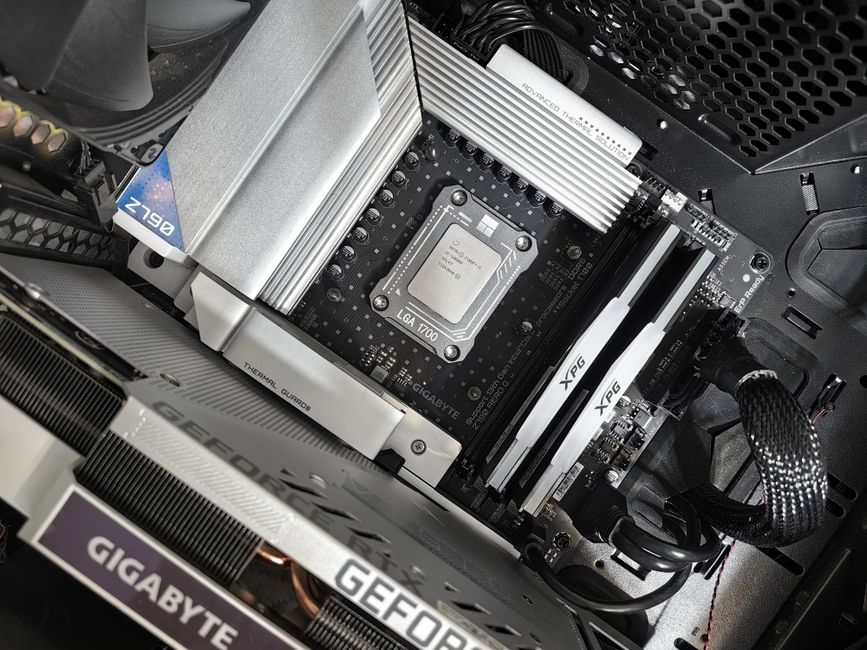
Building a budget gaming PC for 1080p resolution in 2026 can be a challenging but rewarding task. With the right components and a strategic approach, you can create a powerful gaming machine that delivers exc nt performance without breaking the bank. In this guide, we’ll walk you through the process of selecting the best components, assembling your PC, and optimizing it for the ultimate 1080p gaming experience.
Overview of Budget Gaming PCs
A budget gaming PC is designed to provide a balance between cost and performance, allowing gamers to enjoy their favorite titles at 1080p resolution without spending a fortune. The key to building a successful budget gaming PC lies in carefully selecting the right components and making smart compromises. By focusing on the most important aspects of gaming performance, such as the processor, graphics card, and RAM, you can create a machine that delivers exc nt value for money.
Quick pick: Compare top-rated Pc options.
Choosing the Right Processor for Your Budget Gaming PC
When it comes to processors, there are two main options for budget gaming PCs in 2026: Intel and AMD. Both companies offer a range of processors that provide good gaming performance at different price points. Some popular choices include the Intel Core i5-12400F and the AMD Ryzen 5 5600X. When selecting a processor, it’s essential to consider the balance between cost and performance, as well as the compatibility with your other components.
Picking the Best Graphics Card for 1080p Gaming
The graphics card is arguably the most crucial component in a gaming PC, as it directly impacts the visual quality and performance of your games. For 1080p gaming in 2026, some top choices include the NVIDIA GeForce RTX 3060 Ti and the AMD Radeon RX 6700 XT. These cards offer exc nt performance and features, such as ray tracing and high refresh rates, while remaining relatively affordable. When choosing a graphics card, consider factors such as memory, clock speeds, and power consumption to ensure compatibility with your other components.
Selecting Other Key Components
In addition to the processor and graphics card, there are several other components that play a vital role in your budget gaming PC’s performance. These include the motherboard, RAM, storage, cooling, and power supply. For the motherboard, look for options that support your chosen processor and have the necessary features, such as M.2 slots for fast storage. When it comes to RAM, aim for at least 16GB of DDR4 memory to ensure smooth multitasking and gaming performance. For storage, consider a combination of a fast SSD for your operating system and frequently-used games, and a larger HDD for additional storage space.
Assembling Your Budget Gaming PC
Once you have all your components, it’s time to start assembling your budget gaming PC. This process involves carefully installing each component into your case and connecting the necessary cables. Some key steps include installing the CPU and cooling solution, attaching the motherboard to the case, and connecting the power supply. Throughout the assembly process, refer to your components’ manuals and online resources for guidance and troubleshooting tips.
Optimizing Your Budget Gaming PC for 1080p
After assembling your PC, it’s essential to optimize its settings and performance for the best possible 1080p gaming experience. This includes updating drivers and software, adjusting in-game settings, and monitoring your PC’s temperature and performance. Some tips for optimizing your budget gaming PC include enabling GPU overclocking, adjusting graphics settings for the best balance between visual quality and performance, and using software tools to monitor your system’s health and performance.
Common Issues and Troubleshooting
Like any PC, budget gaming PCs can sometimes encounter issues that impact performance and stability. Some common problems include overheating, freezing, and crashing. To troubleshoot these issues, start by checking your PC’s temperature and ensuring that all components are properly cooled. If your PC is overheating, consider adding more fans or upgrading your cooling solution. If your PC is freezing or crashing, check your drivers and software for updates and compatibility issues. In some cases, you may need to reinstall your operating system or replace faulty components.
Conclusion and Final Thoughts
Building a budget gaming PC for 1080p in 2026 requires careful planning, component selection, and optimization. By focusing on the most important aspects of gaming performance, such as the processor, graphics card, and RAM, you can create a powerful machine that delivers exc nt value for money. Remember to balance cost, performance, and reliability when selecting components, and don’t be afraid to make smart compromises to stay within your budget. With the right approach and a little patience, you can build a budget gaming PC that will provide hours of immersive and enjoyable gaming experiences.
Frequently Asked Questions (FAQ)
Can I upgrade my current PC into a budget gaming PC for 1080p?
If you already have a PC, you may be able to upgrade it into a budget gaming PC for 1080p. The key is to identify the components that need upgrading and determine whether the cost of upgrading is justified compared to building a new PC from scratch. Some common components to upgrade include the processor, graphics card, RAM, and storage. When planning an upgrade, consider factors such as compatibility, performance gains, and the overall cost of the upgrade.
How important is it to have a dedicated GPU for my budget gaming PC?
Having a dedicated GPU is essential for delivering smooth and visually impressive gaming performance at 1080p. Unlike integrated GPUs, which share system resources with the CPU, dedicated GPUs have their own memory and processing power, allowing them to handle demanding graphics tasks more efficiently. When choosing a dedicated GPU for your budget gaming PC, consider factors such as memory, clock speeds, and power consumption to ensure compatibility with your other components.
What is the best way to keep my budget gaming PC cool and quiet?
Keeping your budget gaming PC cool and quiet is essential for maintaining its performance and longevity. Some effective cooling solutions include air and liquid cooling systems, as well as high-quality case fans. When selecting cooling components, consider factors such as compatibility, noise levels, and cooling performance. In addition to choosing the right cooling solutions, you can also optimize your PC’s cooling by ensuring proper cable management, using thermal paste, and monitoring your system’s temperature and performance.
Top Product Recommendations
| Product Name | Rating | Key Feature | Est. Price | Action |
|---|---|---|---|---|
| Top-rated budget gaming pc case | ★★★★★ | Editor-recommended budget gaming pc case from this guide | $18–$42 | Check Lowest Price on Amazon |
| Best-value gaming pc cooling | ★★★★☆ | Affordable gaming pc cooling — strong everyday results | $12–$28 | Check Lowest Price on Amazon |
| Premium budget gaming pc power supply | ★★★★☆ | Higher-end budget gaming pc power supply for visible, lasting results | $45–$95 | Check Lowest Price on Amazon |
Affiliate Disclosure: This post contains affiliate links. We may earn a commission if you buy through our links, at no extra cost to you.
Leave a Reply