Overview of PlayStation 4 and PlayStation 5
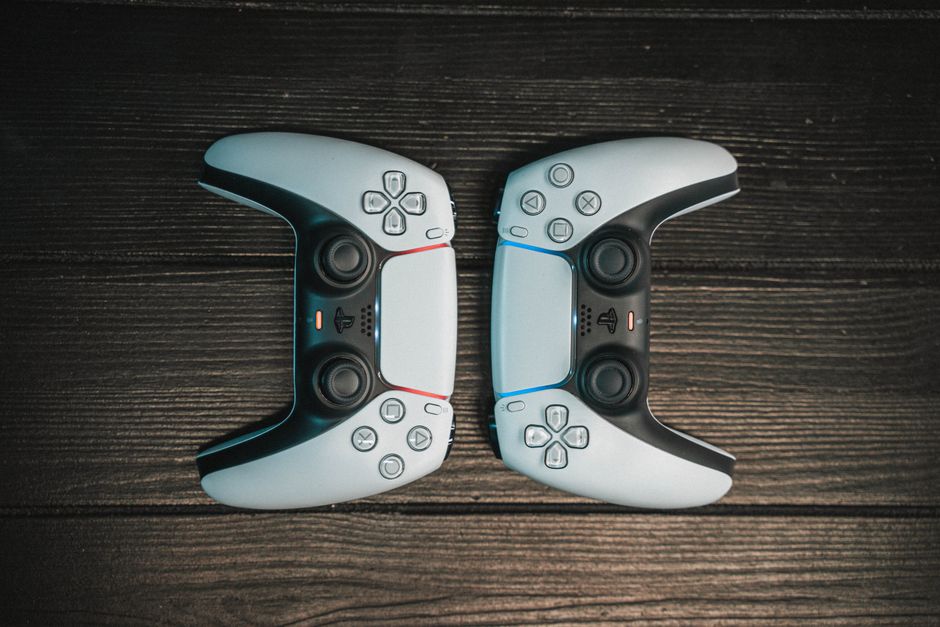
The PlayStation brand has been a cornerstone of American living rooms since Sony launched its first console in the mid-1990s, and two generations stand out as particularly influential today: the PlayStation 4 and the PlayStation 5. The PS4, released in 2013, introduced a streamlined interface and a strong library of exclusive titles that kept it relevant for nearly a decade. The PS5, Sony’s current-generation flagship, arrived in late 2020 with a custom SSD, ray tracing capabilities, and haptic feedback through the DualSense controller.
When comparing raw performance, the PS5 delivers a significant leap forward. Its AMD Zen 2 processor runs at 3.5 GHz compared to the PS4’s 1.6 GHz Jaguar CPU, and its 825 GB solid-state drive virtually eliminates the load times that defined the previous generation. The PS5 also supports 4K gaming at up to 120 frames per second, while the PS4 maxes out at 1080p for most titles. Both consoles share the PlayStation Network ecosystem, meaning your digital library has a degree of cross-compatibility when revisiting older releases.
For US gamers deciding between the two, the choice often comes down to budget and library access. The PS5 is the clear choice for anyone wanting cutting-edge graphics and the newest releases, while the PS4 remains a perfectly viable entry point for those who want to catch up on an incredible backlog of exclusives built up over eight years.
Top Games for PlayStation 4 and PlayStation 5
One of the biggest strengths of the PlayStation ecosystem is its catalog of exclusive titles that simply cannot be played anywhere else. On the PS5 side, standout releases include **Spider-Man 2**, which lets players swing through an open-world New York City as both Peter Parker and Miles Morales, and **Horizon Forbidden West**, a visually stunning action RPG set in a post-apocalyptic America reclaimed by nature. **God of War Ragnarök** continues the emotional father-son story introduced in the 2018 reboot, delivering some of the most polished combat in the action-adventure genre.
The PS4 library is, frankly, massive and deeply affordable at this point in the console’s lifecycle. Must-play exclusives include **The Last of Us Part II**, a controversial but critically acclaimed narrative experience, **God of War (2018)**, **Uncharted 4**, and **Ghost of Tsushima**. Multiplatform hits like **Red Dead Redemption 2**, **Elden Ring**, and **Final Fantasy XVI** also perform exceptionally well on Sony’s hardware. Genres span first-person shooters, open-world RPGs, sports simulations, horror titles, and indie darlings that frequently debut on PlayStation before other platforms.
Upcoming releases worth watching include **Ghost of Tsushima 2** (rumored for 2025), the next major **Final Fantasy** entry, and continued support from third-party developers leveraging the PS5’s enhanced architecture. Whether you are on a PS4 or PS5, the library is one of the strongest arguments for choosing PlayStation over competing consoles.
PlayStation Network and PlayStation Store
The PlayStation Network (PSN) is the online service that powers multiplayer gaming, digital game purchases, and cloud saves across Sony’s ecosystem. Setting up a PSN account is free, and once signed in you gain access to the PlayStation Store, where you can browse, purchase, and download games directly to your console’s storage. The store also features seasonal sales that US gamers have come to anticipate, with deep discounts during major events like Black Friday, the Holiday Sale, and the Summer Flash Sale.
A PlayStation Plus membership unlocks additional benefits that serious gamers should consider. The Essential tier grants monthly free games, exclusive discounts, and cloud storage for saved data. The Extra and Premium tiers add access to a rotating catalog of hundreds of downloadable titles, including many recent releases. For families sharing a single console, PlayStation Plus makes it far more cost-effective to maintain a steady rotation of fresh content without purchasing every title at full price.
Managing your digital library is straightforward through the PSN account management portal on any web browser. You can re-download past purchases, activate your console as your primary system to enable sharing with other accounts in your household, and manage parental controls for younger players. The PSN ecosystem is designed to keep you inside the PlayStation world once you have invested in it, which is why understanding its structure upfront helps you avoid frustration later.
PlayStation VR: Virtual Reality Gaming
PlayStation VR brings immersive virtual reality experiences to the PlayStation ecosystem, and it remains one of the most accessible entry points into VR gaming for US consumers. Unlike PC-based VR setups that can cost well over $1,000, PlayStation VR runs on either a PS4 or PS5 with a dedicated camera and motion controllers, making it a relatively affordable gateway into three-dimensional gaming worlds.
The library of VR titles has grown considerably since the platform’s launch. **Astro Bot Rescue Mission** showcases what the medium does best, using the motion controllers to create a platforming experience that feels genuinely magical. **Resident Evil 7: In VR** delivers genuinely terrifying horror through immersive first-person perspective, and **Beat Saber** has become a cultural phenomenon as a rhythm game that doubles as cardio. **No Man’s Sky VR** and **Skyrim VR** let players explore massive open worlds in ways that flat-screen gaming simply cannot match.
Setting up PlayStation VR requires the camera (which comes bundled with most packages), the VR headset itself, and the motion controllers. The PS5 setup is slightly different from the PS4 version, using a USB-C cable for the newer camera or a compatible adapter for the older model. Calibration takes only a few minutes, and Sony’s on-screen guide walks new users through the process step by step. If you have been curious about VR but hesitant to commit to a high-end PC setup, PlayStation VR remains a compelling and budget-friendly option.
Tips and Tricks for PlayStation Gaming
Getting the most out of your PlayStation experience involves a handful of practical habits that most players overlook at first. Start by managing your console’s storage proactively — both the PS4 and PS5 can fill up quickly if you install large AAA titles without clearing older games. The PS5’s Game Library feature makes it easy to hide installed titles you are not currently playing while keeping them in your library for fast re-download later.
Controller battery life is a common frustration, and there are concrete ways to extend it. Reduce the controller’s vibration intensity in the Settings menu under Accessories, and consider toggling the adaptive trigger resistance in individual game menus when the feature is optional. Carrying a spare controller and keeping it charged ensures you never have to pause mid-session waiting for a battery to recharge.
The PS5’s Activity Cards are one of its most underutilized features. These small overlays, accessible via the control center during compatible games, let you jump directly to specific missions, levels, or challenges without loading the full game world first. For players who replay campaigns or focus on specific trophies, Activity Cards save meaningful amounts of time over the course of a gaming session.
Finally, enable rest mode updates in your system settings. When your PS5 enters rest mode, it can download game updates, system patches, and firmware upgrades automatically, so your console is always ready when you want to play rather than waiting through lengthy download screens.
Common Issues and Troubleshooting
Like any complex piece of hardware, PlayStation consoles occasionally encounter issues that can interrupt your gaming session. One of the most frequent problems US users report is Wi-Fi connectivity dropping during online matches or large downloads. If this happens, first move your console closer to your router or switch to a wired Ethernet connection for maximum stability. You can also forget the saved network in your PS5 settings and re-enter the password to reset the connection stack.
Game crashes and freezing are less common on the PS5 than the PS4 era but still occur, especially with third-party titles that have not been fully optimized. When a game freezes, hold the power button on the console for approximately three seconds to force a complete shutdown, then restart. If a specific title crashes repeatedly, check for a patch — developers frequently release day-one or early patches that address instability, and your game may simply be out of date.
For persistent issues that do not resolve through basic troubleshooting, rebuilding the PS4 or PS5 database can address corrupted file references that cause slow menus and app failures. On the PS5, boot into Safe Mode by holding the power button until you hear a second beep, then select “Rebuild Database” from the menu. This process takes longer than a standard restart but often resolves performance issues that seem inexplicable.
Physical maintenance matters too. Keep your console in a well-ventilated area and dust the vents every few months with compressed air. The PS4 generation in particular is known to accumulate heat over years of use, which can degrade internal components and cause unexpected shutdowns during intensive gaming sessions.
PlayStation Accessories and Add-ons
The right accessories can meaningfully enhance your PlayStation sessions, and Sony’s ecosystem supports a wide range of official and third-party options. The **DualSense Edge** controller is Sony’s premium option, featuring swappable components, remappable buttons, and adjustable trigger stops for competitive gamers who want every advantage. For most players, the standard DualSense that comes bundled with the PS5 already offers industry-leading haptics and adaptive triggers that are worth exploring in games that support them.
A quality gaming headset is arguably the single best upgrade you can make. The **Pulse 3D headset** is Sony’s official wireless option, designed specifically for the PS5’s 3D Audio feature, but licensed alternatives from brands like Turtle Beach and SteelSeries offer comparable performance at various price points. For immersive single-player games, 3D audio genuinely transforms the experience by placing sound cues spatially around your character.
Storage expansion is another practical consideration. The PS5’s SSD fills quickly with modern titles that can exceed 100 GB each, and an external USB drive can offload PS4 titles to free up internal space for PS5-native games. Some US gamers also invest in a vertical stand for the PS5 to improve airflow and desk organization, and controller charging docks are a small convenience that keeps your gear tidy between sessions.
Comparison: PlayStation 4 vs PlayStation 5 Key Specs
| Feature | PlayStation 4 | PlayStation 5 |
|---|---|---|
| Release Year | 2013 | 2020 |
| Processor | AMD Jaguar 8-core @ 1.6 GHz | AMD Zen 2 8-core @ 3.5 GHz |
| Storage | 500 GB / 1 TB HDD | 825 GB SSD (expandable) |
| Maximum Resolution | 1080p | 4K @ 120 fps |
| Controller | DualShock 4 | DualSense |
| VR Support | PlayStation VR | PlayStation VR2 + backwards compat |
| Load Times | Standard HDD | Near-instant SSD loading |
| Ray Tracing | No | Yes (hardware-accelerated) |
Frequently Asked Questions (FAQ)
What is the difference between PlayStation 4 and PlayStation 5?
The PS5 is Sony’s current-generation console, featuring a dramatically faster SSD that eliminates load times, hardware ray tracing for realistic lighting, and the DualSense controller with haptic feedback. The PS4 is the previous generation and still plays a massive library of exc nt games, but it lacks the raw power, speed, and new controller technology of the PS5.
How do I set up and use PlayStation VR?
Connect the PlayStation Camera to your console, plug in the VR headset via USB, and follow the on-screen calibration guide. Pair your motion controllers through the Accessories menu, and download VR titles from the PlayStation Store. The PS5 requires either the newer camera or an adapter for the older PS4 camera model.
What should I do if my PlayStation console is not working properly?
Start with the basics: restart the console, check your internet connection, and ensure your system software is fully updated. For persistent crashes or freezing, try rebuilding the database through Safe Mode. If hardware issues persist, contact Sony support or visit an authorized repair center for diagnostic help.
Which PlayStation Plus tier should I choose?
The Essential tier is sufficient for most players who primarily buy games at sale prices. The Extra tier is worth it if you want access to a rotating library of 300+ downloadable titles. The Premium tier adds cloud streaming and access to classic PS1, PS2, and PSP games — ideal for nostalgic gamers and those who never played earlier PlayStation generations.
Top Product Recommendations
| Product Name | Rating | Key Feature | Est. Price | Action |
|---|---|---|---|---|
| Top-rated DualSense PS5 controller | ★★★★★ | Editor-recommended DualSense PS5 controller from this guide | $18–$42 | Check Lowest Price on Amazon |
| Best-value PlayStation VR headset bundle | ★★★★☆ | Affordable PlayStation VR headset bundle — strong everyday results | $12–$28 | Check Lowest Price on Amazon |
| Premium PS5 vertical stand with cooling fan | ★★★★☆ | Higher-end PS5 vertical stand with cooling fan for visible, lasting results | $45–$95 | Check Lowest Price on Amazon |
Affiliate Disclosure: This post contains affiliate links. We may earn a commission if you buy through our links, at no extra cost to you.
Leave a Reply