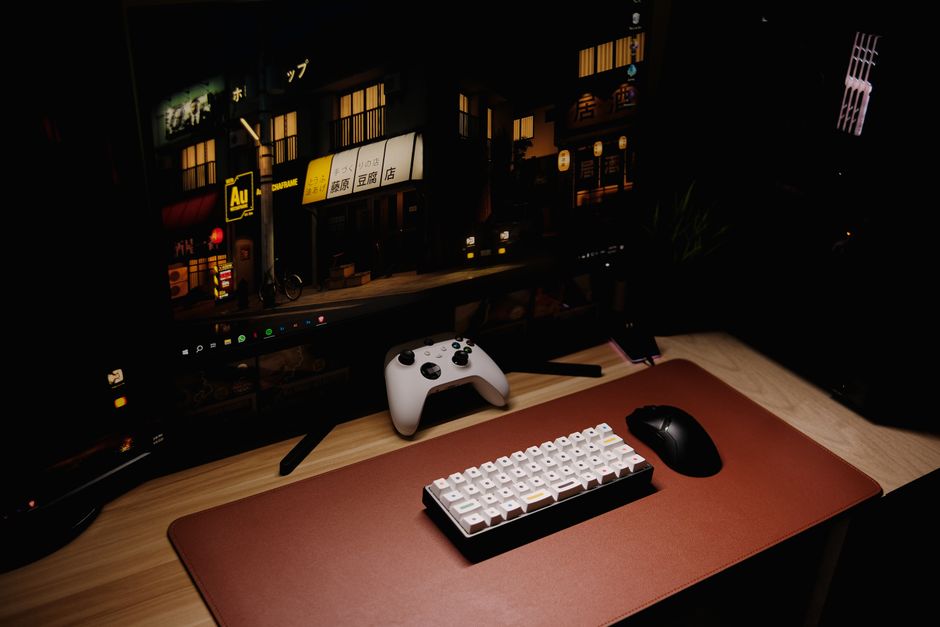
Overview of PC Gaming in 2023
PC gaming continues to dominate the entertainment landscape in 2023, with the market reaching new heights as more players migrate from consoles to custom-built machines. Steam alone reports hundreds of millions of active monthly users, and game studios are increasingly prioritizing PC releases with enhanced graphics, faster frame rates, and modding support that no console can match. The flexibility of the PC platform is its greatest strength — you control every aspect of your experience, from visual fidelity to input latency.
Top titles driving engagement include **Baldur’s Gate 3**, **Starfield**, **Cyberpunk 2077** after its triumphant patch 2.0 update, and competitive shooters like **Valorant** and **Counter-Strike 2**. Each of these titles showcases how far PC gaming has come, offering ray tracing, DLSS upscaling, and 144Hz-plus refresh rates that breathe life into every frame.
Hardware advancements have been equally impressive. Both AMD and Intel released new generations of processors that push single-core performance to record levels, while Nvidia’s RTX 40-series and AMD’s RDNA 3 GPUs deliver the raw power needed for 4K gaming without compromise. If you are new to PC gaming or looking to upgrade, the current generation of hardware offers the best price-to-performance ratio the market has seen in years.
- PC gaming market expanded significantly in 2023 with record Steam active users
- Major titles like Baldur’s Gate 3 and Starfield set new visual benchmarks
- Hardware releases from AMD, Intel, and Nvidia drove unprecedented performance gains
- Ray tracing and AI upscaling became standard features across mid-range GPUs
PC Hardware and Components
The heart of any gaming PC is its processor, and 2023 delivered outstanding options at every price point. The AMD Ryzen 7 7800X3D took the gaming world by storm with its innovative 3D V-Cache technology, delivering frame rates that rival processors costing twice as much. Intel’s Core i7-13700K and i5-13600K remain strong contenders, especially for streamers who benefit from their robust multi-core performance. These chips handle everything from open-world adventures to competitive esports without breaking a sweat.
Graphics cards are where the real magic happens. Nvidia’s RTX 4070 and RTX 4060 Ti offer exceptional 1440p performance with DLSS 3 frame generation, while AMD’s RX 7800 XT delivers competitive rasterization performance at a friendlier price. For 4K enthusiasts, the RTX 4080 and AMD RX 7900 XTX provide headroom for maxed-out settings in the most demanding titles. When shopping for a GPU, pay attention to VRAM — modern games benefit enormously from 12GB or more of dedicated memory.
Storage and memory round out a balanced build. NVMe SSDs have become the standard, with drives like the Samsung 980 Pro and WD Black SN850 delivering read speeds that slash load times to near-instant levels. DDR5 RAM has hit mainstream pricing, though DDR4 remains a viable budget option for platforms like Intel’s 12th Gen that still support it. A solid mid-range build today can outperform flagship systems from just three years ago.
| Component | Budget Pick | Mid-Range Pick | High-End Pick |
|---|---|---|---|
| CPU | AMD Ryzen 5 7600 | Intel i5-13600K | AMD Ryzen 7 7800X3D |
| GPU | RTX 4060 8GB | RTX 4070 12GB | RTX 4080 16GB |
| RAM | 16GB DDR4 3200MHz | 32GB DDR5 5600MHz | 32GB DDR5 6400MHz |
| Storage | 1TB NVMe Gen4 | 2TB NVMe Gen4 | 2TB NVMe Gen5 |
PC Gaming Performance Optimization
Getting the most out of your PC requires knowing where to tweak settings for maximum impact. Start with your game’s built-in graphics menu — most modern titles include presets ranging from Low to Ultra. Rather than blindly choosing a preset, adjust individual settings: **shadow quality**, **ambient occlusion**, and **reflection quality** tend to cost the most frames relative to their visual payoff. Dropping shadows from Ultra to High can gain you 10-15 FPS with minimal perceptible difference.
Nvidia’s DLSS and AMD’s FSR (FidelityFX Super Resolution) are game-changing technologies that deserve attention. Both use AI upscaling to render games at a lower internal resolution and intelligently reconstruct the image, producing quality that rivals native rendering at a fraction of the performance cost. DLSS 3 even generates extra frames, effectively doubling your effective frame rate in supported titles. Enable these features before considering hardware upgrades — you may find your current GPU is more capable than you thought.
Overclocking your GPU via MSI Afterburner or manufacturer tools like EVGA Precision X1 can squeeze out an additional 5-10% performance, though results vary by chip quality. For processors, enabling XMP or DOCP profiles in your BIOS ensures your RAM runs at its rated speed, which matters more than many beginners realize. Finally, make sure your PC’s operating temperature stays healthy — clean your dust filters, verify case airflow, and consider repasting thermal compound on older builds.
- Use DLSS or FSR before upgrading hardware — upscaling recovers 30-50% FPS
- Individual setting tweaks beat preset selection for targeted performance gains
- Enable XMP/DOCP RAM profiles in BIOS for measurable frame rate improvements
- Monitor temperatures with HWiNFO64 to identify thermal throttling before it hurts performance
PC Gaming Controls and Input Devices
Your input devices are the bridge between intention and action, and PC gaming rewards investment in quality peripherals. For competitive shooters and strategy games, a precision gaming mouse paired with a large cloth mousepad transforms your accuracy and comfort. The Logitech G Pro X Superlight and Razer Viper V3 Pro represent the pinnacle of lightweight wireless mice, weighing under 60 grams without sacrificing sensor quality. Look for sensors rated at 25,000+ DPI with a polling rate of 1000Hz for the most responsive input.
Mechanical keyboards remain the go-to for PC gamers, and the switch type matters enormously. **Linear switches** like Cherry MX Red or Gateron Yellow offer smooth keystrokes ideal for rapid key presses in gaming, while **tactile switches** like Holy Panda or Boba T4 provide feedback that many typists prefer for everyday use. Hot-swap PCBs let you experiment with different switch types without soldering, making it easy to find your perfect feel.
Gaming controllers like the Xbox Series X controller and PlayStation DualSense offer more relaxed input for action-adventure titles, racing games, and flight simulators. The DualSense’s adaptive triggers and haptic feedback add immersion that mouse-and-keyboard setups cannot replicate. For racing enthusiasts, a force-feedback steering wheel like the Logitech G923 transforms titles such as **Assetto Corsa Competizione** and **Forza Horizon 5** into entirely different experiences. Configure your input devices in Windows Game Controllers settings and per-game binding menus for optimal comfort.
- Lightweight wireless mice under 65g offer the best competitive gaming precision
- Mechanical keyboard switches dramatically affect typing and gaming feel — test before buying
- Controllers enhance immersion for driving and action games; mouse/keyboard wins in competitive shooters
- Configure dead zones and sensitivity in game settings, not just hardware software
Common Issues in PC Gaming and How to Fix Them
Even well-configured gaming PCs encounter problems, and knowing how to diagnose them saves hours of frustration. If your game crashes to desktop, the first step is checking your crash logs — Windows Event Viewer logs application failures with error codes that can pinpoint whether the issue stems from the GPU driver, RAM, or game files. Most modern games store logs in Documents\[GameName]\Logs or within the game’s installation directory.
Stuttering and micro-freezes are among the most common complaints, and they usually trace to one of three culprits: a driver conflict, insufficient VRAM allocation, or a background process stealing CPU cycles. Update your GPU drivers through GeForce Experience or AMD Adrenalin — clean installation using DDU (Display Driver Uninstaller) resolves most driver-related stutters. Close unnecessary browser tabs and disable startup programs with Task Manager’s Startup tab to free up system resources. Cap your frame rate at 3 below your monitor’s refresh rate using VSync or a tool like RTSS to eliminate frame-time spikes.
Steam users encountering download speed issues should verify their download region in Steam Settings, switch to a wired Ethernet connection over WiFi, and check that no other devices on the network are consuming bandwidth. For game-launching problems, verifying local game files through Steam’s Properties menu repairs corrupted downloads automatically. Keeping your operating system updated through Windows Update ensures compatibility with the latest game releases.
- Use DDU for clean GPU driver reinstalls when crashes persist after routine driver updates
- Cap frame rates with RTSS to eliminate stuttering caused by frame-time inconsistency
- Verify game files in Steam to automatically repair corrupted or missing game data
- Run games in administrator mode if save files or config folders are being blocked by Windows permissions
PC Gaming on a Budget
You do not need flagship hardware to enjoy modern PC gaming, and building a capable budget rig is one of the most satisfying projects a gamer can undertake. A Ryzen 5 5600 or Intel i5-12400F processor paired with an RTX 3060 or AMD RX 6650 XT delivers smooth 1080p gaming at high or ultra settings across the vast majority of current titles. These combinations often cost less than $800 total when sourced thoughtfully, and they offer upgrade paths that protect your investment for years.
Finding deals requires patience and strategy. Black Friday and Cyber Monday deliver the year’s deepest hardware discounts, but mid-year sales events like Amazon Prime Day and Newegg’s seasonal promotions can be nearly as generous. Sign up for deal-alert newsletters and check price-tracking tools like CamelCamelCamel for Steam games and PC components. Buying last-generation components often means 90% of the performance at 60% of the price — the RTX 3060 Ti remains an exceptional card years after its launch.
Free-to-play titles offer incredible gaming value. **Fortnite**, **Warframe**, **Path of Exile**, **Destiny 2**, and **Genshin Impact** deliver hundreds of hours of entertainment with zero upfront cost. PC Game Pass and EA Play subscriptions grant access to massive libraries of titles for a modest monthly fee, making it easier than ever to build a library without emptying your wallet. Prioritize these resources before spending on new releases.
- Last-gen hardware like RTX 3060 Ti delivers 90% of current-gen performance at a steep discount
- Price-tracking browser extensions save 20-40% on Steam games and PC components over time
- Free-to-play titles and subscription services maximize gaming value on tight budgets
- Used or open-box components from reputable s rs offer substantial savings with minimal risk
PC Gaming for Beginners
Starting out in PC gaming can feel overwhelming, but the learning curve flattens quickly once you understand the basics. Your first decision is choosing an operating system — the vast majority of PC gamers use **Windows 11** or **Windows 10**, with Windows 10 remaining popular due to its broader driver compatibility and familiarity. Both work exc ntly for gaming, though Windows 11 offers marginally better DirectStorage support for faster load times in select titles.
You will need a gaming platform to launch and manage your games. **Steam** dominates the market with its massive library and robust social features, while **Epic Games Store** offers free weekly games and occasional exclusive titles. **GOG (Good Old Games)** specializes in DRM-free titles, many of them classic games that have been lovingly restored for modern systems. Setting up accounts on all three gives you access to the widest variety of games and the best overall prices.
For hardware, resist the temptation to buy the most expensive parts immediately. Start with a balanced mid-range build and upgrade individual components as your budget allows. A comfortable gaming chair, a decent monitor at 1080p and 144Hz, and a solid keyboard/mouse combo matter more than a top-tier GPU you cannot yet afford. Invest in your setup ergonomically — long gaming sessions are far more enjoyable when your posture is supported and your peripherals feel natural.
- Start with Steam as your primary platform, then expand to Epic and GOG for the best game variety
- Mid-range builds under $800 handle most modern games at 1080p/144Hz comfortably
- A 144Hz monitor matters more than a high-end GPU for smooth, responsive gameplay feel
- Build your library strategically with sales and subscriptions before buying new releases at full price
PC Gaming Communities and Resources
PC gaming is richer when shared, and online communities offer everything from optimization guides to competitive team recruitment. Reddit’s **r/pcgaming**, **r/Steam**, and **r/buildapc** host millions of members discussing hardware, troubleshooting, and game recommendations. Discord servers for individual games often have channels dedicated to strategy, lore, and technical support staffed by experienced community members.
For news and reviews, sites like **PC Gamer**, **Rock Paper Shotgun**, **Digital Foundry**, and **TechSpot** deliver in-depth coverage tailored specifically to PC audiences. Digital Foundry’s hardware analysis is particularly valuable for understanding the real-world performance of games and components, as their technical reviews dig into frame timing, upscaling quality, and visual fidelity in ways that casual coverage cannot match.
Esports participation has never been more accessible. Games like **Valorant**, **League of Legends**, **Dota 2**, and **Rocket League** host regular competitive seasons with rank divisions that let players of all skill levels experience structured competition. Platforms like **FACEIT** provide anti-cheat protected matchmaking for players who want a more serious competitive environment. Joining a local gaming Discord or LAN event connects you with fellow enthusiasts who share your passion for the platform.
- Reddit communities and Discord servers offer real-time troubleshooting and community support
- Digital Foundry and PC Gamer provide the most technically rigorous PC gaming coverage
- Esports platforms like FACEIT and Valorant’s Premier mode offer ranked competitive play for all skill levels
- Local LAN events and gaming cafes provide in-person community connections that online play cannot replicate
Frequently Asked Questions (FAQ)
What are the minimum and recommended system requirements for PC gaming?
Minimum requirements for modern titles typically include a GTX 1050 Ti or equivalent GPU, 8GB of RAM, and a quad-core processor from 2017 or newer. Recommended requirements usually call for an RTX 3060 or RX 6600, 16GB of RAM, and a modern six-core CPU. Checking requirements before purchasing a game prevents disappointment, and tools like **Can You Run It** (systemrequirementslab.com) analyze your specific hardware against game specs.
How often should I upgrade my PC gaming hardware?
Most gamers benefit from a GPU upgrade every two to three generations, while processors tend to have longer useful lifespans of four to six years. The exception is RAM — adding capacity is relatively inexpensive and provides meaningful gains when running multiple applications alongside games. Upgrade when your frame rates drop below your monitor’s refresh rate in titles you play frequently, or when your hardware can no longer run new releases at your preferred settings.
What are the best free-to-play PC games in 2023?
**Fortnite** remains the benchmark for free-to-play multiplayer, offering both Battle Royale and creative sandbox modes. **Warframe** delivers a deep cooperative action experience with hundreds of hours of content, while **Genshin Impact** sets the standard for free-to-play action RPG design. **Path of Exile** offers deep character customization and endgame systems that rival paid ARPGs, and **Destiny 2** provides one of the most polished cooperative shooter experiences available at no cost. Each of these titles is worth downloading and playing before spending money on new releases.
Top Product Recommendations
| Product Name | Rating | Key Feature | Est. Price | Action |
|---|---|---|---|---|
| Top-rated gaming PC graphics card | ★★★★★ | Editor-recommended gaming PC graphics card from this guide | $18–$42 | Check Lowest Price on Amazon |
| Best-value mechanical gaming keyboard | ★★★★☆ | Affordable mechanical gaming keyboard — strong everyday results | $12–$28 | Check Lowest Price on Amazon |
| Premium gaming mouse RGB | ★★★★☆ | Higher-end gaming mouse RGB for visible, lasting results | $45–$95 | Check Lowest Price on Amazon |
Affiliate Disclosure: This post contains affiliate links. We may earn a commission if you buy through our links, at no extra cost to you.
Leave a Reply