Introduction
Building a budget gaming PC for 1080p gaming in 2026 is one of the smartest investments a PC gamer can make. Whether you are upgrading from an older system or starting fresh, putting together a capable 1080p rig does not require breaking the bank. A budget gaming PC build gives you the freedom to play the latest titles, handle multitasking, and even dip into content creation — all without the premium price tag of a high-end setup.
The sweet spot for 1080p gaming in 2026 sits around the $600–$900 range, depending on which components you prioritize. This guide walks you through every decision, from selecting the right processor to squeezing every frame out of your graphics card. By the end, you will know exactly what parts to buy, how to assemble them, and how to optimize your system for smooth, reliable 1080p gameplay.
The core philosophy here is balance. A powerful GPU paired with a weak processor will bottleneck your frame rates, while an overpowered CPU with a budget graphics card leaves performance on the table. Every component in a budget gaming PC build must work in harmony to deliver the best possible experience at 1080p resolution.
Quick pick: Compare top-rated Pc options.
CPU and Processor
The processor is the brain of your gaming PC, and choosing the right one sets the tone for your entire build. For 1080p gaming in 2026, you do not need a $400 flagship chip — a solid mid-range CPU handles most games with ease and leaves room in your budget for a better graphics card.
**AMD’s Ryzen 5 5600X** remains a popular choice for budget builds, offering 6 cores and 12 threads at a competitive price point. It pairs well with DDR4 motherboards and keeps thermals manageable with the included Wraith Stealth cooler. If you want to step slightly above, the **Ryzen 5 7600X** with DDR5 support brings newer architecture benefits without a dramatic price jump.
On the Intel side, the **Core i5-12400F** and its successor, the **Core i5-13400F**, offer exc nt gaming performance per dollar. These processors feature hybrid core designs that handle both gaming and background tasks efficiently. The i5-12400F, in particular, has become a staple in budget gaming PC builds thanks to its affordability and low power draw.
| CPU | Cores / Threads | TDP | Architecture | Best For |
|---|---|---|---|---|
| AMD Ryzen 5 5600X | 6 / 12 | 65W | Zen 3 | DDR4 budget builds |
| AMD Ryzen 5 7600X | 6 / 12 | 105W | Zen 4 | DDR5 mid-range builds |
| Intel Core i5-12400F | 6 / 12 | 65W | Alder Lake | All-around value |
| Intel Core i5-13400F | 10 / 16 | 148W | Raptor Lake | Multitasking and gaming |
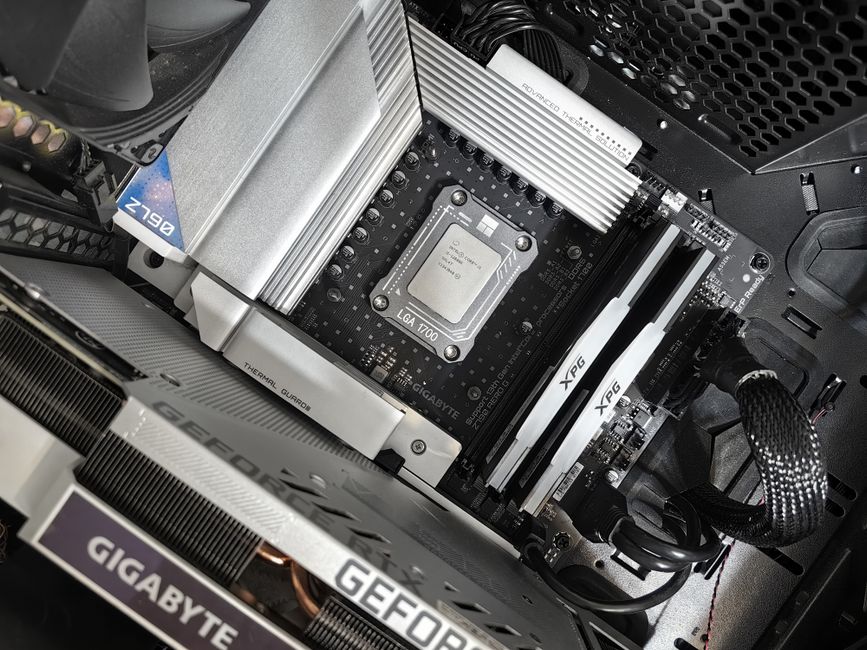
When selecting a CPU, consider your motherboard platform. AMD AM4 boards with DDR4 RAM tend to be the most budget-friendly option for a 1080p gaming PC build in 2026, while Intel’s LGA 1700 platform offers forward compatibility with DDR5. Either route works well — just ensure your chosen CPU and motherboard are compatible.
GPU and Graphics Card
The graphics card is the single most important component for gaming performance, and it commands the largest share of your budget. For 1080p gaming in 2026, you need a GPU that can handle modern titles at medium-to-high settings without stuttering.
**NVIDIA’s GeForce RTX 4060** is a natural fit for budget 1080p builds. It delivers solid rasterization performance and adds DLSS 3 frame generation for extra headroom in demanding games. The 8GB VRAM buffer is adequate for 1080p, though mod-heavy titles may push that limit over time.
**AMD’s Radeon RX 7600** competes directly with the RTX 4060 and often undercuts it on price. It excels in traditional rasterization workloads and supports AMD’s FSR 3 upscaling technology. For pure frames-per-dollar value at 1080p, the RX 7600 is hard to beat in a budget gaming PC build.
If you can stretch your budget slightly higher, the **RTX 4060 Ti** or **AMD RX 7700 XT** offer noticeable performance gains in GPU-intensive titles. These cards can maintain 60+ FPS at high settings in most 2026 releases, giving your build a longer practical lifespan.
- **RTX 4060** — Best for DLSS 3 and ray tracing support
- **AMD RX 7600** — Best raw performance per dollar
- **RTX 4060 Ti** — Step up for higher settings and longer future-proofing
- **AMD RX 7700 XT** — Strong alternative for high-FPS 1080p gaming
Avoid overpaying for flagship GPUs in a budget build. The RTX 4070 and above targets 1440p and 4K — money better spent on a better monitor or additional storage in a 1080p setup.
Motherboard and RAM
The motherboard connects every component in your build, so choosing a reliable platform matters more than chasing the latest features. For a budget gaming PC build targeting 1080p, a mid-range motherboard with essential connectivity is the smart play.
On the AMD side, the **B550** chipset motherboard strikes the ideal balance. It supports PCIe 4.0, has multiple USB ports, and pairs with Ryzen 5000-series CPUs without requiring an expensive X570 board. The **MSI B550M PRO-VDH** and **Gigabyte B550M DS3H** are reliable budget options that do not compromise on stability.
Intel builders should look at **B660** or **B760** chipset boards for 12th and 13th Gen processors respectively. These boards support DDR4 (saving you money compared to DDR5-only Z-series boards) and include features like M.2 storage slots and decent VRM quality for a gaming processor.
RAM capacity for 1080p gaming in 2026 should be **16GB minimum** — ideally in a dual-channel configuration (2x8GB). Most modern games already recommend 16GB, and running a single stick limits your bandwidth unnecessarily. If your budget allows, 32GB provides headroom for streaming, video editing, or running multiple applications alongside games.
| Component | Recommended Budget Option | Why It Works |
|---|---|---|
| Motherboard (AMD) | B550 chipset | PCIe 4.0, reliable VRM, affordable |
| Motherboard (Intel) | B660 / B760 chipset | DDR4 support, solid build quality |
| RAM | 16GB DDR4/DDR5 dual-channel | Standard for 1080p gaming in 2026 |
| RAM Speed | DDR4-3600 / DDR5-6000 | Optimal balance of speed and cost |
Keep your RAM speed in mind when building. AMD Ryzen CPUs benefit from DDR4-3600 for its Infinity Fabric clock synchronization, while Intel CPUs are generally less sensitive to RAM speed but still perform better with faster kits.
Storage and Cooling
Storage speed directly affects load times, map streaming, and how quickly your operating system boots. For a budget gaming PC build, an **SSD is non-negotiable** — spinning hard drives introduce frustrating load stutters that no amount of GPU power can fix.
A **1TB NVMe SSD** should be your starting point. PCIe 3.0 drives like the **WD Black SN770** or **Samsung 980** offer exc nt read/write speeds at reasonable prices. If your budget is tight, a smaller NVMe drive for your OS and key games paired with a larger HDD for storage is a workable compromise.
Cooling your gaming PC does not require exotic liquid cooling setups. The stock cooler that comes with most mid-range processors handles thermal loads adequately for a budget build. If you want quieter operation or plan to do mild CPU overclocking, a budget air cooler like the **Noctua NH-D15** or **be quiet! Dark Rock 4** offers a significant upgrade over stock coolers at a modest price.
- **NVMe SSD (1TB)** — Fast boot times, quick game loading
- **SATA SSD** — Budget fallback for additional storage
- **Air Cooler Upgrade** — Lower temperatures and quieter operation
- **Case Fans** — At least two intake and one exhaust for proper airflow
Proper cable management inside your case also improves airflow significantly. Ensure your case has adequate ventilation and position intake fans at the front and exhaust fans at the rear or top.
Power Supply and Case
The power supply is the component most often neglected in budget builds — a critical mistake. A unreliable PSU can damage your entire system or cause random crashes during gaming sessions. Aim for at least an **80+ Bronze certified PSU** with enough wattage to cover your components plus headroom.
For a typical budget gaming PC build with an RTX 4060 or RX 7600, a **550W–650W 80+ Bronze** PSU is sufficient. The **Corsair CX650M** and **EVGA SuperNOVA 650 GQ** are well-regarded options that offer solid build quality and reliability at budget-friendly prices. If you prefer fully modular cables for cleaner builds, the **Seasonic Focus GX-650** is worth the modest premium.
Selecting a case comes down to airflow and compatibility. A budget ATX case with mesh front panels and decent dust filtration serves a gaming build well. The **NZXT H510 Flow**, **Cooler Master TD300 Mesh**, and **Fractal Design Pop Air** all offer good airflow at reasonable price points. Ensure your case supports your motherboard form factor — mATX boards fit in most ATX cases, but not all ATX boards fit in mATX cases.
- **PSU Wattage** — 550W minimum for single-GPU budget builds
- **80+ Bronze or better** — Ensures at least 82% efficiency
- **Case Airflow** — Mesh front panels outperform solid panels for gaming thermals
- **Cable Management** — Modular or semi-modular PSUs simplify clean builds
Do not buy the cheapest PSU available. Spending a little more here protects every other component in your build from electrical damage.
Assembly and Optimization
Assembling your budget gaming PC build is a rewarding process that takes two to four hours with proper preparation. Before you begin, clear a well-lit workspace and gather your tools — a Phillips-head screwdriver, anti-static wrist strap (optional but recommended), and zip ties for cable management.
Start by installing the CPU onto the motherboard, then seat your RAM sticks, and mount your NVMe SSD before securing the motherboard into the case. Install the power supply last or second-to-last, then connect all power cables from the PSU to the motherboard, GPU, and drives. Finally, install your graphics card into the primary PCIe slot and connect any case fans and front panel headers.
Once your system is assembled, installing Windows and drivers is straightforward. Download the latest drivers from NVIDIA, AMD, and your motherboard manufacturer’s website to ensure optimal performance. Enable **XMP or DOCP profiles** in your BIOS to run your RAM at its rated speed — many budget boards do not enable this automatically.
- **Prepare your workspace** before opening any component boxes
- **Install CPU and cooler** before seating the motherboard in the case
- **Connect front panel headers** carefully — USB, audio, and power switch leads
- **Enable XMP/DOCP** in BIOS to get full RAM performance from day one
Common assembly mistakes include forgetting the I/O shield, overtightening CPU cooler screws, and failing to connect front panel audio. Double-check each connection before powering on for the first time.
Testing and Benchmarking
Before diving into gaming sessions, testing and benchmarking your new budget gaming PC build validates that every component performs as expected. This step catches faulty parts early and establishes a performance baseline for future comparisons.
Start with a stress test using **Cinebench R23** or **AIDA64** to verify your CPU runs within normal temperature ranges under load. Run a GPU stress test with **FurMark** or **Unigine Superposition** for 15–20 minutes to confirm your graphics card stays stable. Monitor temperatures with **HWiNFO** or **MSI Afterburner** throughout these tests.
For gaming benchmarks, run your most-played titles at your target settings and record average FPS, 1% low FPS, and minimum frame times. **Shadow of the Tomb Raider**, **Cyberpunk 2077**, and **Forza Horizon 5** are solid 1080p benchmarks that cover different engine architectures and GPU demands.
| Benchmark Tool | What It Tests | Target Result |
|---|---|---|
| Cinebench R23 | CPU single/multi-core | Higher score = better |
| 3DMark Time Spy | GPU gaming performance | 1080p Target: 8,000+ |
| CrystalDiskMark | SSD read/write speeds | NVMe: 5,000+ MB/s read |
| Heaven Benchmark | GPU + cooling stability | Stable at 60+ FPS |
Comparing your results against community benchmarks for your specific CPU and GPU combination reveals whether your build is performing within expected ranges. Significant underperformance often points to thermal throttling, driver issues, or incorrect BIOS settings.
Frequently Asked Questions (FAQ)
What is the ideal budget for a 1080p gaming PC in 2026?
A practical budget for a solid 1080p gaming PC in 2026 falls between **$600 and $900** depending on current component pricing. This range covers a capable mid-range CPU, a reliable GPU like the RTX 4060 or RX 7600, 16GB RAM, and a 1TB NVMe SSD. Going lower than $500 often forces compromises that hurt gaming performance significantly, while going above $900 starts drifting into 1440p territory.
How can I ensure my gaming PC is future-proof for upcoming games?
Focus on three key areas for future-proofing: **RAM capacity** (32GB now gives you years of headroom), **GPU upgrade potential** (ensure your PSU and case accommodate a larger card later), and **motherboard chipset** (AMD B550 and Intel B760 platforms support CPU upgrades within the same socket generation). Buying a slightly better GPU than you strictly need today extends your build’s relevance by 12–18 months.
What are some common pitfalls to avoid when building a budget gaming PC?
The most common mistakes include **pairing a weak CPU with a strong GPU** (causing bottlenecks), **buying only one RAM stick instead of two** (halving your bandwidth), **neglecting the power supply quality** ( risking component damage), and **forgetting an SSD** (slow storage ruins otherwise fast systems). Take your time on component selection and verify compatibility between your CPU, motherboard socket, and RAM type before purchasing.
What frame rates can I expect from a budget 1080p gaming PC build?
A well-balanced budget build centered on an RTX 4060 or RX 7600 delivers **60+ FPS at high settings** in most modern titles at 1080p. Competitive esports games like Valorant and Counter-Strike 2 routinely exceed 200 FPS, while graphically demanding games like Starfield and Avatar: Frontiers of Pandora stay comfortably above 60 FPS at medium-to-high settings with DLSS or FSR upscaling enabled.
Top Product Recommendations
| Product Name | Rating | Key Feature | Est. Price | Action |
|---|---|---|---|---|
| Best Pc Pick | ★★★★★ | Top-rated overall | $25–$45 | Check Lowest Price on Amazon |
| Budget Pc Option | ★★★★☆ | Great for beginners | $12–$28 | Check Lowest Price on Amazon |
| Premium Pc Choice | ★★★★☆ | Pro-level results | $50–$90 | Check Lowest Price on Amazon |
Affiliate Disclosure: This post contains affiliate links. We may earn a commission if you buy through our links, at no extra cost to you.
Leave a Reply