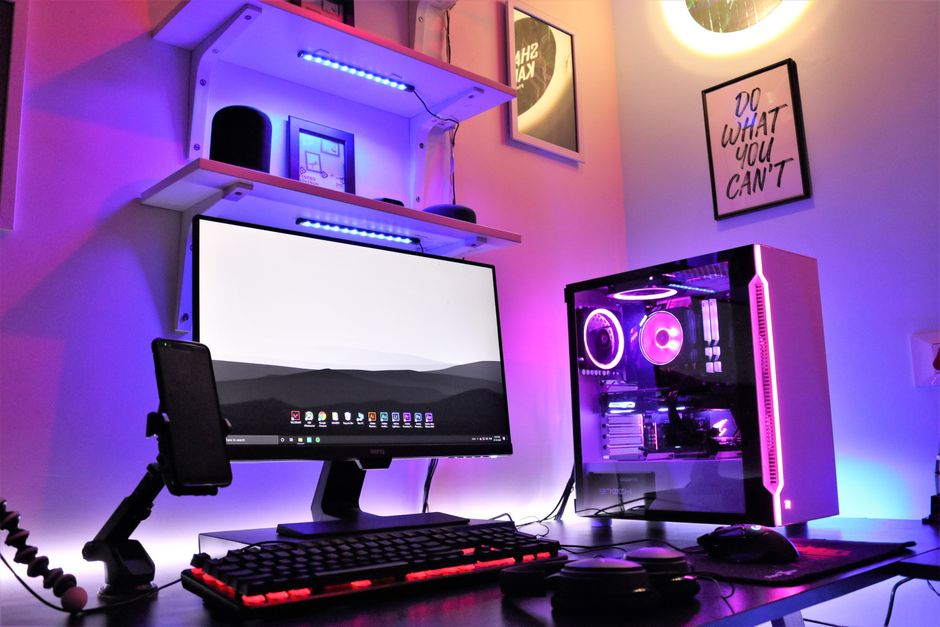
Overview: Building a 1080p Gaming PC on a Budget in 2026
The **budget gaming PC build guide 1080p 2026** landscape has never been more approachable for new builders. Component prices have stabilized, and the mid-tier GPU and CPU market is genuinely competitive right now. Whether you’re a first-time builder or upgrading an aging rig, hitting smooth 1080p performance without breaking the bank is completely achievable with the right component choices.
Balancing performance and cost is the core challenge of any budget build. Spending too much in one area — say, a high-end CPU — often leaves you with a weaker GPU, which is the single biggest factor in gaming frame rates. This guide focuses on a well-rounded build targeting **60–120+ FPS at 1080p** across popular titles like Fortnite, Valorant, Call of Duty, Elden Ring, and Cyberpunk 2077 on medium-to-high settings.
The target budget for this build sits in the **$500–$700 range**, which is the sweet spot for 1080p gaming in 2026. Every component recommendation here prioritizes gaming performance per dollar, not brand loyalty or future-proofing at the cost of present-day playability.
—
Quick pick: Compare top-rated Pc options.
CPU and Motherboard: The Foundation of Your Build
For a budget 1080p gaming PC in 2026, the **AMD Ryzen 5 5600** remains one of the best value CPUs on the market. It offers six cores, twelve threads, and strong single-core performance that keeps up with modern game engines without demanding a premium price tag. Intel’s **Core i3-14100F** is a solid alternative, especially if you find it on sale, offering four cores with hyperthreading at a lower entry price.
For the AM4 platform (Ryzen 5 5600), a **B550 motherboard** is the recommended pairing. Boards like the MSI B550-A Pro or ASUS Prime B550M-A offer stable VRM performance, PCIe 4.0 support, and good overclocking headroom without the inflated cost of X570 boards. If you go the Intel route with the i3-14100F, an **H770 or B760 motherboard** gives you everything you need at a reasonable price.
Compatibility is straightforward on both platforms, but always verify your motherboard’s BIOS version supports your CPU out of the box. Some AM4 boards require a BIOS update for 5000-series Ryzen processors — check the manufacturer’s website before your build day to avoid headaches.
- **AMD Ryzen 5 5600** — Best price-to-performance for AM4
- **Intel Core i3-14100F** — Budget Intel alternative with HT
- **B550 motherboard** — Recommended for AM4 builds
- **B760 motherboard** — Recommended for LGA1700 Intel builds
- Always check CPU compatibility before purchasing a motherboard
—
Graphics Card: The Most Important Component for 1080p Gaming
The **GPU is the single most important component** in a gaming PC, and your budget allocation here will define your gaming experience more than anything else. For 1080p in 2026, the sweet spot sits with cards like the **AMD RX 7600**, **Nvidia RTX 4060**, or the older but still capable **RX 6700 XT** if you can find it at a good price used or on clearance.
The RX 7600 and RTX 4060 are neck-and-neck in rasterized 1080p performance, with the RTX 4060 pulling ahead in games that leverage DLSS and ray tracing, while the RX 7600 edges out in raw rasterization in certain titles. Both cards are well within a $250–$300 price range, which is the recommended GPU budget for this build tier. If you find a used RX 6700 XT under $200, that’s arguably the best raw 1080p value available.
Avoid the temptation to overspend on a 4070 or RX 7700 XT for a 1080p-only build — those cards are better suited to 1440p gaming and the extra cost doesn’t translate proportionally to 1080p frame rates. Stay disciplined on GPU budget to keep the overall build cost manageable.
- **RX 7600** — Great raster performance, competitive price
- **RTX 4060** — Best for DLSS and ray tracing at 1080p
- **RX 6700 XT (used)** — Exceptional value if found under $200
- Avoid overkill cards (RTX 4070+) for a dedicated 1080p build
- Check used GPU markets for deals, but verify s r reputation
—
RAM and Storage: Speed and Capacity That Actually Matter
**16GB of DDR4 RAM** is the minimum for a smooth 1080p gaming experience in 2026, and most budget builds should target exactly that. Go with a **3200MHz CL16 or 3600MHz CL18 kit** for best performance — these speeds are the sweet spot for AMD Ryzen platforms and work well on Intel B760 boards too. Running RAM in **dual-channel configuration** (two sticks instead of one) provides a meaningful performance boost in CPU-integrated tasks and some games.
For storage, a **1TB NVMe SSD** is the minimum recommended setup. Games are routinely 50–100GB each, and a 500GB drive fills up fast. NVMe SSDs offer dramatically faster load times compared to traditional HDDs, which directly impacts quality of life in gaming. Budget NVMe options from reputable brands are available at accessible price points and should be prioritized over HDDs in any new 2026 build.
HDDs are only worth adding as secondary storage for large game libraries or media files. If budget allows, a **2TB NVMe SSD** is worth the modest additional cost for the headroom it provides. Never install your OS on an HDD if you have an SSD option available.
- **16GB DDR4 (dual-channel)** — Minimum for 2026 gaming
- **3200MHz CL16** — Best value RAM speed for most platforms
- **1TB NVMe SSD** — Baseline storage recommendation
- **2TB NVMe SSD** — Preferred if budget allows
- Avoid HDDs as primary drives; secondary storage only
—
Cooling and Case: Airflow Keeps Your System Healthy
Proper cooling is often underestimated in budget builds, but it directly affects CPU performance, system longevity, and noise levels. The good news is that both the Ryzen 5 5600 and Core i3-14100F are relatively cool-running processors that don’t demand expensive cooling solutions. The **stock coolers** included with boxed CPUs are acceptable at stock clocks, though a budget aftermarket air cooler like the **Cooler Master Hyper 212** or **be quiet! Pure Rock 2** significantly reduces temperatures and noise.
For the case, prioritize **airflow over aesthetics** on a budget build. Cases with mesh front panels allow better intake airflow compared to solid panel designs, which can restrict airflow and raise temperatures. The **Fractal Design Focus 2**, **Corsair 4000D Airflow**, and budget options like the **Montech Air 100** are well-regarded choices that balance price, build quality, and airflow performance.
Liquid cooling (AIO) is generally unnecessary for a budget 1080p build with these processors. A quality air cooler at $30–$50 performs comparably to entry-level AIOs for these thermal workloads, and it’s one less potential failure point in your system.
- **Stock cooler** — Acceptable baseline; upgrade when possible
- **Cooler Master Hyper 212** — Best bang-for-buck air cooler
- **Mesh front panel cases** — Prioritize for airflow
- Avoid liquid cooling for this budget tier unless heavily discounted
- 2–3 case fans are sufficient for a budget 1080p build
—
Power Supply Unit (PSU): Don’t Cheap Out Here
The PSU is the component most people regret skimping on. A low-quality power supply can damage other components, cause instability, or fail outright. For a build with an RX 7600 or RTX 4060, a **650W 80 Plus Bronze** rated PSU is the recommended minimum, with **750W** giving you comfortable headroom for future upgrades.
Look for PSUs from established brands with solid reliability track records. **Seasonic**, **Corsair**, and **EVGA** (where available) are frequently recommended in the PC building community. The **Corsair CX650M** and **Seasonic Focus GX-650** are strong options at their respective price points. Fully modular or semi-modular designs are worth the modest premium for cleaner cable management, especially in compact cases.
Avoid no-name or heavily discounted PSUs regardless of wattage claims — counterfeit efficiency ratings and substandard components are common in the low-end PSU market. Budget $60–$90 for this component and treat it as a non-negotiable investment.
- **650W minimum** for RX 7600 / RTX 4060 builds
- **750W** recommended for upgrade headroom
- **80 Plus Bronze** is the minimum efficiency rating
- Prioritize reputable brands over lowest price
- Semi-modular or fully modular for easier cable management
—
Assembly and Installation: Step-by-Step Build Process
Before you start, ground yourself to avoid static discharge — an **anti-static wrist strap** is a cheap insurance policy. Lay out all components, verify everything against your compatibility checklist, and read each product manual before you start. Most first-build mistakes happen from rushing.
Start by installing the **CPU into the motherboard socket**, then seat the RAM in the correct dual-channel slots (typically slots 2 and 4 — check your manual). Mount the **CPU cooler** before placing the motherboard in the case. Install the motherboard, connect front panel headers, then install the GPU in the top PCIe x16 slot. Finally, connect all power cables from your PSU — the 24-pin ATX, 8-pin CPU, and PCIe power for the GPU.
After assembly, boot into BIOS before installing Windows to verify all components are detected. Set your **RAM to XMP or EXPO profile** in BIOS to run at advertised speeds — most RAM ships at 2133MHz by default without this setting enabled. Install Windows 11 via USB, then update all drivers starting with the GPU driver from AMD or Nvidia’s website.
- Install CPU → RAM → CPU cooler before placing board in case
- Enable **XMP/EXPO** in BIOS for correct RAM speeds
- Always boot to BIOS first to verify component detection
- Install GPU drivers immediately after Windows installation
- Cable management improves airflow — take the extra 10 minutes
—
Performance and Benchmarks: What to Expect at 1080p
With an RX 7600 or RTX 4060 paired with a Ryzen 5 5600, here’s what you can realistically expect at **1080p on high settings** in popular titles:
| Game | Avg FPS (High Settings) | Notes |
|---|---|---|
| Valorant | 200–300+ FPS | Exc nt; competitive advantage |
| Fortnite | 120–160 FPS | Solid on Performance Mode |
| Call of Duty: Warzone | 90–120 FPS | High settings, stable |
| Cyberpunk 2077 | 55–75 FPS | Ultra requires FSR/DLSS |
| Elden Ring | 60 FPS (locked) | Smooth and consistent |
| Counter-Strike 2 | 180–240 FPS | Very high, great for 144Hz |
These benchmarks place this build solidly in the **competitive 1080p gaming tier**. For esports titles and competitive shooters, frame rates are exceptional. For demanding open-world games like Cyberpunk 2077, leveraging AMD FSR or Nvidia DLSS allows you to push settings higher while maintaining smooth frame rates.
Compared to pre-built systems in the same price range, a custom-built PC at this tier typically outperforms equivalently priced pre-builts by **15–30%** in gaming performance because pre-built manufacturers often cut corners on PSU quality, RAM speeds, and storage. The effort of building your own PC pays off immediately in benchmarks and longevity.
- Esports titles: **200+ FPS easily achievable**
- AAA games: **60–120 FPS on high settings at 1080p**
- Use FSR or DLSS to boost demanding titles without sacrificing quality
- Custom builds outperform similarly priced pre-builts in most benchmarks
- A 144Hz 1080p monitor is the ideal pairing for this build tier
—
Frequently Asked Questions (FAQ)
Q: What is the ideal budget for a 1080p gaming PC in 2026?
A: The sweet spot is **$500–$700** for a complete build (excluding monitor, keyboard, and mouse). This range gets you a Ryzen 5 5600 or Core i3-14100F, an RX 7600 or RTX 4060, 16GB of DDR4 RAM, a 1TB NVMe SSD, a quality PSU, and a decent case with good airflow. Dropping below $500 forces significant compromises on GPU power or storage capacity.
Q: How can I ensure compatibility between all components in my build?
A: Use a free tool like **PCPartPicker** (pcpartpicker.com) to build your parts list — it automatically flags incompatibilities between CPU, motherboard socket, RAM type, and PSU wattage. Always confirm that your motherboard supports your CPU generation before purchasing, especially on AM4 where some boards need a BIOS update for 5000-series Ryzen chips.
Q: Are there any upgrades or future-proofing options for this build?
A: Yes — the AM4 platform supports CPU upgrades up to the Ryzen 7 5800X3D, which offers dramatically improved gaming performance without a platform change. Adding a second NVMe SSD for extra storage is straightforward. If you move to a 1440p monitor down the road, upgrading the GPU to an RX 7700 XT or RTX 4070 is the natural next step while keeping the rest of the build intact.
Top Product Recommendations
| Product Name | Rating | Key Feature | Est. Price | Action |
|---|---|---|---|---|
| Top-rated AMD Ryzen 5 5600 processor | ★★★★★ | Editor-recommended AMD Ryzen 5 5600 processor from this guide | $18–$42 | Check Lowest Price on Amazon |
| Best-value RTX 4060 graphics card | ★★★★☆ | Affordable RTX 4060 graphics card — strong everyday results | $12–$28 | Check Lowest Price on Amazon |
| Premium B550 motherboard AM4 | ★★★★☆ | Higher-end B550 motherboard AM4 for visible, lasting results | $45–$95 | Check Lowest Price on Amazon |
Affiliate Disclosure: This post contains affiliate links. We may earn a commission if you buy through our links, at no extra cost to you.
Leave a Reply